

A financial model can calculate every formula correctly and still point to the wrong decision. That’s often why financial models fail: assumptions don’t reflect how the business operates, cash movements are mistimed or overlooked, and scenarios aren’t tested against the decisions leaders actually face.
A 13-week cash flow forecast, for example, can lose value when collections, supplier payments or other cash outflows don’t match their timing in the business. The forecast is only as useful as the assumptions and inputs behind it.
Build a model that explains outcomes, not one that simply produces them. Test best-case, base and downside assumptions, connect inputs, capture cash outflows and assess investment choices. Formula errors and unclear design can distort results, so build checks into the process. The goal is a model with traceable logic and outputs that support a decision, whether you’re forecasting liquidity, valuing a business or assessing an investment.
A forecast becomes unreliable when its assumptions stop matching business conditions. Changes in customer demand, pricing, input costs or payment timing can flow through the income statement and cash flow, shifting the result. Economic conditions can also change these operating drivers faster than assumptions are updated. Treat the base case as a working view, not a fact, and show how plausible changes affect the decision.
Build three cases around the same operating model. The most-likely case uses the current view of volume, pricing and costs; the downside case tests weaker drivers; the upside case tests stronger ones. For example, a formula that multiplies a revenue input by 1.05 embeds a 5% growth assumption. Put that assumption in a labelled input cell, then vary it by scenario rather than rewriting formulas. Compare the resulting revenue, working capital and cash flow. In an LBO model, scenario analysis can also show how different operating outcomes affect debt repayment and returns. Keep the assumptions visible and traceable, as in LBO scenario modelling.
Overconfidence can make a preferred outcome look more certain than it is. Confirmation bias may then lead a modeller to select supporting evidence and dismiss contrary signals, such as slower orders or rising costs. Separate observed results from judgement-based assumptions. Record why each key assumption was chosen, then test whether a less favourable input changes the conclusion. If the investment only works under the upside case, make that dependency clear in the decision summary.
Use quality-control checks throughout the build, not just before delivery. Confirm that scenario switches change the intended inputs and outputs, then trace key forecast lines back to their assumptions and compare the results with the business’s operating logic. Review formulas, model structure and outputs, then stress-test the model. Ask a colleague to spot-check scenario formulas and confirm that totals and cash flow reconcile across cases. These checks can expose a copied formula, a hardcoded exception or an assumption that fails to flow through the model.
Copying monthly sales from a CRM export into Excel can introduce mistakes before forecasting begins. A pasted range might omit a new product, duplicate a customer or retain an outdated filter. If the revenue schedule uses that file while the expense schedule uses a separate finance export, the model combines different versions of the business.
Disconnected systems weaken the audit trail. Payroll might be updated in the accounting system but not in a linked workbook. The model then forecasts expenses from stale data, while supporting reports show a different figure. External workbook links add risk: moving or renaming a source file can break formulas or leave references pointing to an old period.
Use a controlled input structure. Store each assumption or imported data set in one place, label its source and period, then reference it wherever needed. Consolidate calculations in one workbook rather than linking several files. In a three-statement model, connect revenue, expenses, receivables and payables through schedules. Map data from separate systems to consistent account names before it enters the forecast, an area where financial systems and advisory firms like Moorgate Accounting can help align underlying business ledgers with operational reporting.
As an organisation adds users and reporting needs, manual spreadsheets can create more hand-offs and opportunities for local edits to diverge from the approved model. Shared workbooks still need controls. Protect formula cells, identify the owner of each input tab and record changes to key assumptions. Colour conventions can help reviewers distinguish hardcodes from formulas.
Before relying on outputs, reconcile imported totals to source reports and investigate differences. Confirm that each refresh covers the same period, entities and account categories. Then trace a sample figure, such as payroll expense, from its source through the model to the income statement and cash flow. These controls help locate errors before they affect a forecast. Practical exercises in financial modelling courses can help build disciplined spreadsheet habits.
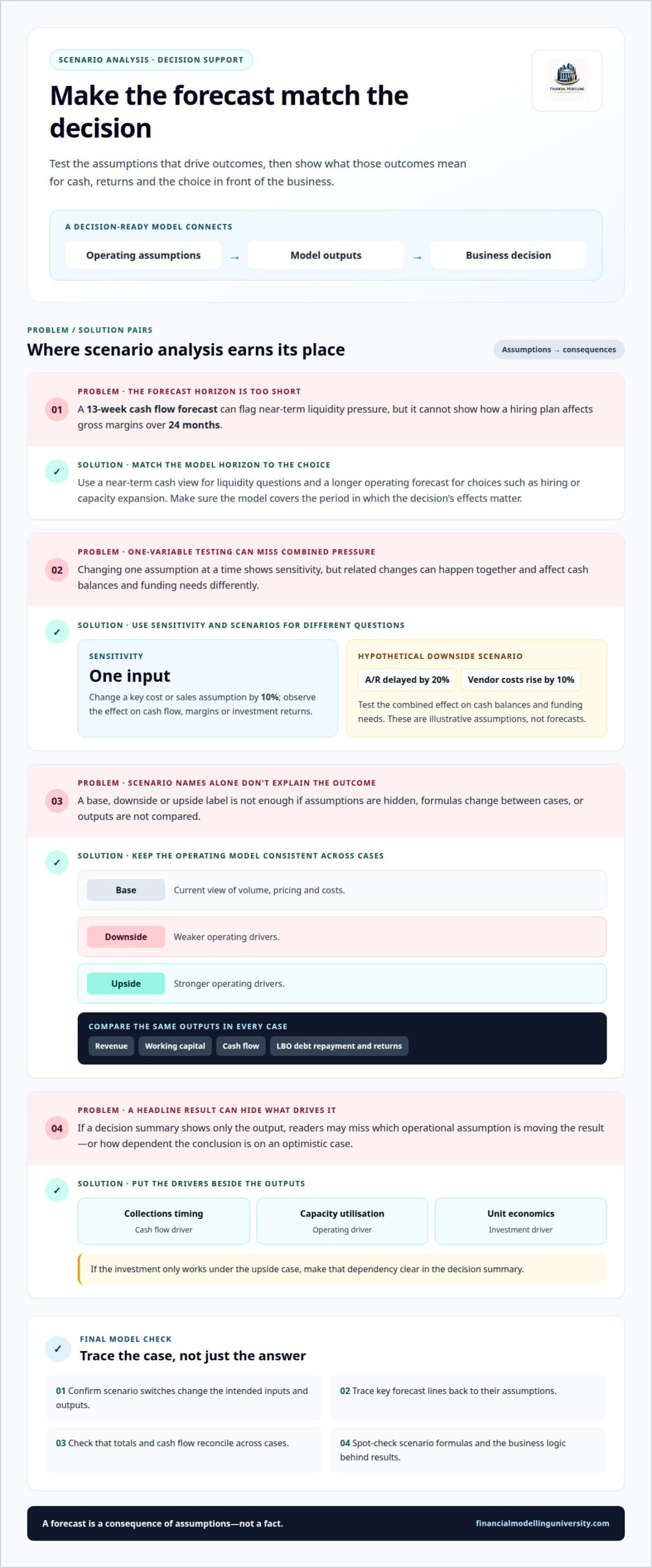
A forecast is a consequence of assumptions, not a fact. Strategic analysis should connect those assumptions to a specific choice, such as hiring, expanding capacity or accepting a project. A 13-week cash flow forecast can flag near-term liquidity pressure, but it cannot show how a hiring plan affects gross margins over 24 months. Match the model’s horizon to the decision.
Sensitivity analysis changes one input at a time to show which drivers move the result. For example, change a key cost or sales assumption by 10% and observe the effect on cash flow, margins or investment returns. If the output barely moves, that input may not drive the decision. If it moves sharply, the decision depends on that assumption and needs closer scrutiny.
Scenario planning tests several related changes together. As a hypothetical downside case, assume top-tier accounts receivable is delayed by 20% and critical vendor costs rise by 10%. These are illustrative assumptions, not forecasts. Track their combined effect on cash balances and funding needs, rather than judging each change in isolation. Maintain base, stress and growth scenarios, using labelled assumptions that flow through the same calculations. This keeps differences in results tied to changed drivers, not altered formulas.
A failed model can lead a business to commit to hiring or investment without enough cash. An investor may misjudge expected returns or downside exposure. The model can also obscure which operational driver needs attention, leaving decision-makers without a clear action. Present key outputs alongside their drivers, such as collections timing, capacity utilisation or unit economics.
Use the analysis to define decision triggers. For instance, a management team might defer an expansion if the stress case breaches its internal liquidity threshold. State that threshold as a model input and show which assumptions cause it to be reached. This turns scenario output into a decision rule, not a decorative chart. Build decision-focused modelling skills with FMU’s financial modelling courses.
A copied formula can distort revenue, expenses or debt repayment across a forecast. In a three-statement model, a cost entered with the wrong sign can flow incorrectly into profit and cash. The workbook may still calculate, so clean-looking outputs don’t prove the logic is sound. Test formulas, rather than relying only on the results Excel displays.
Keep assumptions in labelled input cells rather than embedding them in formulas. For example, a formula that multiplies revenue by 1.025 embeds a growth assumption. Put that rate in a clearly named cell and reference it, so a reviewer can identify what drives the calculation. For an exceptional period, use a labelled override input instead of manually changing one formula. Keep the override visible and explain its purpose in the model.
Review formula patterns across each forecast row. Compare the first, middle and final periods to find formulas that differ unexpectedly. Check for hardcoded values in calculation rows, broken references, error messages and formulas that omit a period. In a debt schedule, confirm that opening debt, new borrowing, repayments and closing debt reconcile from period to period. In a cash flow statement, trace cash movements to the balance sheet.
Build checks into the workbook as you go. Add a balance sheet check that returns zero when assets equal liabilities plus equity. Add a cash roll-forward check comparing calculated closing cash with the balance sheet balance. Trace key outputs, such as exit proceeds or DSCR, back through their formulas to the underlying drivers. Ask a colleague to review a calculation they didn’t build; a fresh reader may spot unclear logic or an unexpected exception.
Document material changes so the next reviewer can distinguish an intentional adjustment from an accidental edit. When a check fails, find the first period where the variance appears, then trace upstream instead of correcting the final output. This preserves the model’s logic and makes the error easier to diagnose.
Understanding why financial models fail is a starting point, not the finish line. Make model quality part of decision preparation: define the decision first, identify the assumptions that could change it, and make the link from input to output easy to follow. This discipline helps a forecast remain useful as business conditions and priorities shift.
For each key output, trace the relevant inputs and formulas, then check that the result makes sense. Test how changes to important assumptions affect the decision, and make sure the model’s structure makes those changes easy to follow. These checks help keep analysis clear and useful for valuation and investment decisions.
Explore financial modelling courses if you want structured practice building and checking models.
A 13-week cash flow forecast fails when its timing assumptions don’t reflect actual cash movements. An invoice can be recorded as revenue while the customer pays later, leaving the forecast overstating available cash. The forecast covers the coming 90 days, so update it weekly with actual cash activity and revised assumptions. Separate expected receipts from confirmed payments to make short-term liquidity risks clearer.
Common mistakes include using unsupported assumptions, mixing actuals with forecasts and overlooking how accounting entries affect cash. For example, a model may record a large equipment purchase as an expense immediately, even though financial statements treat the purchase and its depreciation differently. Check that each assumption has a clear basis, each schedule feeds the right statement and each output follows the business’s accounting logic.
A good financial model answers a defined decision and lets another analyst follow its logic without narration. It connects operating drivers to financial statements, distinguishes actual results from forecasts and includes checks for key reconciliations. For example, a revenue forecast might show how customer volumes and pricing produce sales, then link those sales to receivables and cash collections. The level of detail should suit the decision.
Rebuild when repeated patches make the model’s structure difficult to understand or its calculations unreliable. A failed colour or formula audit can be a warning sign; don’t rely on a 25% threshold. First identify whether failures are isolated or systemic. If formula patterns, inputs and schedules need widespread correction, a clean rebuild can make logic easier to test than continuing to layer fixes.
Transparency helps decision-makers see which assumptions drive an output and where judgement enters the forecast. Sophisticated formulas add little value if a reviewer can’t explain why a valuation changes or how cash reaches the closing balance. Keep calculations visible, use clear labels and break complex logic into understandable steps. A model stakeholders can interpret is more useful in a meeting than one only its builder understands.
Trace key outputs back through the calculations to their assumptions and source schedules. Check that totals reconcile, such as the balance sheet balancing and opening cash plus the net change in cash equalling closing cash. Then vary important drivers to see whether outputs move in a logical direction. These checks help identify broken links or unexpected formulas before the model informs a decision.