

A profitable forecast can still leave a business short of cash. A three-statement financial model shows why by linking net income to operating cash flow, balance sheet cash and any revolver borrowing needed to cover a shortfall. The key is to connect each schedule so changes in revenue, working capital or debt flow consistently through the forecast.
This guide explains how the income statement, balance sheet and cash flow statement connect, and how to build the model in a clear sequence. You’ll see how net income flows into cash flow, how cash reconciles across the statements and how a revolver can respond when cash falls below the required level. You’ll then learn how to extend the foundation into valuation and other decision-making models. Build the links carefully, and the model becomes a practical tool for understanding performance, funding needs and the assumptions behind both.
A three-statement financial model links the income statement, balance sheet and cash flow statement in one forecast. Build the schedules so that changes in profit, assets, liabilities and financing flow through consistently.
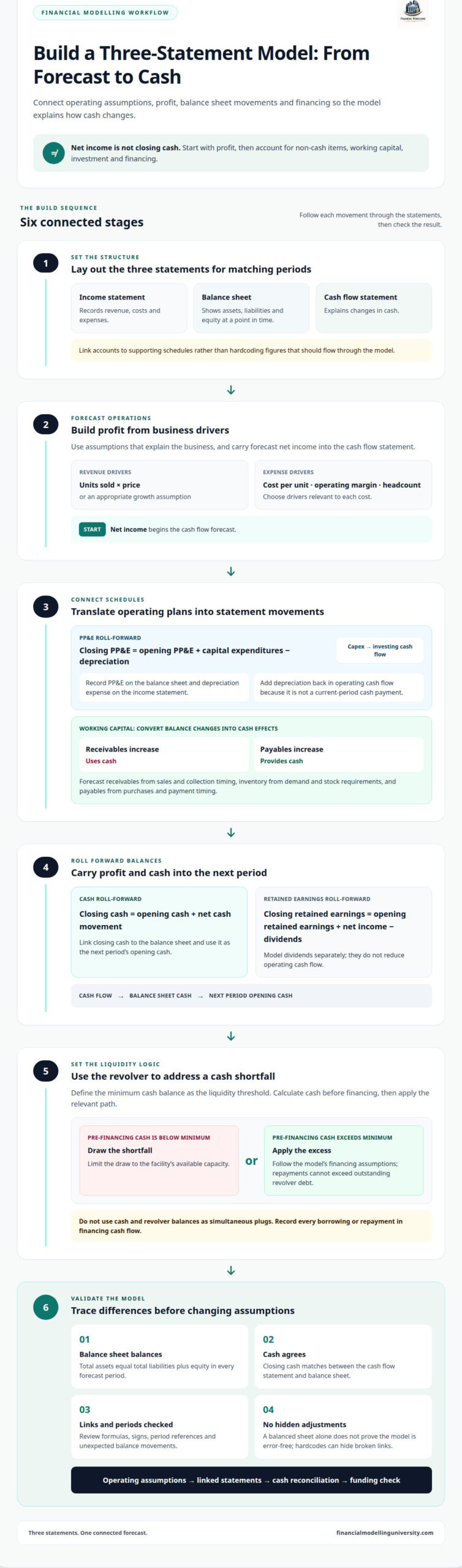
Start by laying out the income statement, balance sheet and cash flow statement for matching periods. The income statement records revenue, costs and expenses; the balance sheet shows assets, liabilities and equity at a point in time; and the cash flow statement explains changes in cash. Link net income to retained earnings and interest expense to debt assumptions. Avoid hardcoding figures that should flow from supporting schedules.
Carry ending cash from the cash flow statement into cash on the balance sheet for the same period. Begin with opening cash, add or subtract the period’s net cash movement, and calculate closing cash. That closing figure becomes the next period’s opening cash. Common mistakes include misaligned periods, omitted cash flows and links to the wrong cells. Excel templates and examples can provide a starting layout, but inspect their formulas before relying on them.
Build a property, plant and equipment (PP&E) schedule to track capital assets. Calculate closing PP&E as opening PP&E plus capital expenditures, less depreciation. Capital expenditures represent cash invested in assets, so include them in investing cash flow. Record PP&E on the balance sheet and depreciation expense on the income statement. Add depreciation back in operating cash flow because it reduces accounting income without being a current-period cash payment.
Compare opening and closing balances for working capital items such as receivables, inventory and payables. Translate each change into its cash flow effect: an increase in receivables uses cash, while an increase in payables provides cash. Check the sign of every movement and confirm that closing cash agrees across both statements. A three-statement model often forecasts several years, so a broken link can distort multiple periods and undermine later analysis.
Start the cash flow forecast with net income, then adjust for non-cash items and changes in operating assets and liabilities. Forecast revenue, expenses, working capital and capital expenditures from operating assumptions, not unsupported plugs.
Identify each income statement item that changes profit without using or generating cash in the period. Depreciation is a key example: it reduces net income but is added back in cash flow from operations. Link the depreciation assumption to the PP&E schedule, and don’t add back a cash expense as though it were non-cash. This keeps reported income distinct from cash generated by operations.
Carry net income from the income statement into retained earnings on the balance sheet. Use the roll-forward formula: closing retained earnings equals opening retained earnings plus net income, less dividends. Keep periods aligned, and model dividends separately so they don’t reduce operating cash flow. If retained earnings doesn’t roll forward, inspect the net income link and any distributions before changing other balance sheet assumptions.
Set the cash and revolver logic after completing the forecast cash flow statement. These accounts show whether operating cash funds the business or borrowing covers a shortfall.
Complete the operating, investing and financing sections before calculating the cash plug. Begin with opening cash, then add the net movement from all three sections to derive closing cash. Link that closing balance to the balance sheet and carry it forward to the next forecast period. Check that each borrowing or repayment appears in financing cash flow, rather than being entered only as a balance sheet adjustment.
Check that total assets equal total liabilities plus equity in every forecast period. Confirm that cash agrees between the balance sheet and cash flow statement, then trace any difference to its source. A three-statement model isn’t error-free just because the balance sheet balances: a hardcoded adjustment can hide a broken link. Review formulas, signs and period references when a balance changes unexpectedly.
Start with historical financial results, then extend the statement links into forecasts and decision tools. Use this sequence to create a reliable foundation for DCF valuation, LBO analysis and other advanced models.
A well-built three-statement financial model can provide an operating foundation for decisions beyond the forecast. Test how changes in business drivers affect liquidity, borrowing needs and valuation, then tailor the model to the decision at hand. This discipline turns spreadsheet outputs into analysis you can explain and defend.
For a structured next step, Financial Modelling University offers online training in LBO Financial Models and DCF & Valuation, with a Real Estate Models course upcoming. Choose the path that matches the model you want to build, and practise applying its techniques to realistic financial modelling problems. Explore the available financial modelling courses and keep developing your Excel skills with purpose. Each well-tested model builds a stronger foundation for the next.
First identify which formulas depend on one another, then decide whether the circular link reflects the financing logic. Revolver interest, for example, may depend on average debt, while debt depends on cash available after interest. Break the loop with an explicit assumption or use Excel’s iterative calculation settings. Document the method and test whether the model converges consistently when key assumptions change.
Use SEC EDGAR filings to collect a company’s reported financial statements and supporting disclosures. Start with annual reports, then review interim filings for more recent performance. Before importing figures into Excel, record the filing period, units and accounting basis. Read the notes for segment definitions, one-off items and debt terms. This context helps prevent misleading comparisons across periods or between companies with different reporting presentations.
Financial modelling requires accounting knowledge, Excel proficiency and the ability to translate business assumptions into formulas. Build your skills by explaining what each key output means, not just by writing formulas. Practise tracing formula precedents, using scenario analysis and documenting assumptions. Clear documentation matters: another analyst should be able to follow your logic, understand your inputs and reproduce the result without relying on unexplained hardcodes.
An integrated forecast helps assess how changing business conditions could affect decisions. For example, compare a base case with a downside case where customer demand weakens, then examine whether planned investment or financing remains viable. Use scenario analysis to isolate the assumptions driving the difference. The forecast is most useful when decision-makers can connect each scenario’s output to a clear operating assumption.
They let you trace an assumption through the forecast instead of reviewing isolated outputs. In Excel, select a key result and inspect its formula precedents to see which inputs drive it. Then change one assumption and observe whether the affected schedules respond as intended. If an output doesn’t change, look for a missing formula link or hardcoded value in that calculation path.
Collect comparable reporting periods and supporting details that explain material movements, such as segment performance, debt terms, asset additions and unusual expenses. Include notes that clarify changes in accounting presentation or fiscal period length. These details help distinguish a lasting operating trend from a one-off event. Keep source references beside inputs so you can trace each historical figure back to its filing during review.