

You’ve spent three hours tracing cell precedents, yet your three statement model balance sheet not balancing remains a stubborn reality. It’s a frustrating scenario. The income statement and cash flow look perfect, but the balance sheet refuses to zero out. You know that using an artificial plug is a shortcut that compromises model integrity and risks professional credibility. Even a minor discrepancy in a working capital schedule or a misaligned debt link can derail an entire LBO or DCF valuation.
This article provides a systematic diagnostic framework to identify the exact root cause of the variance across forecast periods. Stop guessing and start auditing. You’ll learn how to correct underlying schedule linkages and implement automated check rows to maintain model integrity. We’ll walk through seven essential checks, from verifying cash flow signs to reconciling retained earnings, ensuring your financial modelling remains robust, precise, and professional.
A three statement model balance sheet not balancing signals a structural failure in your logic. Don’t waste time hunting individual formulas without a plan. Instead, implement an explicit balance check row immediately below your balance sheet. Calculate the difference between Total Assets and the sum of Total Liabilities and Equity. In professional financial modelling, this row serves as your primary diagnostic tool. If this cell isn’t zero, your model is fundamentally broken and cannot be used for valuation or decision-making. A clean check row allows you to spot errors instantly as you build out complex schedules.
Track the variance across your forecast horizon to narrow down the error type. A constant variance across all years suggests a static error, such as an incorrect opening balance or a missed line item in the balance sheet totals. Conversely, a growing or changing variance indicates a flow issue. This typically stems from errors in net income, depreciation, or working capital schedules. For example, if your variance is £500 in Year 1 and £1,000 in Year 2, look for a £500 non-cash expense like depreciation that hasn’t been added back to the cash flow statement correctly.
Start your audit with the historical periods. If the balance sheet doesn’t balance in Year 0, your projections will never align. Confirm that every historical asset equals its corresponding liability and equity total before moving to the forecast. Next, verify the cash link. The closing cash balance on your cash flow statement must drive the cash line within current assets on the balance sheet. If you’ve hardcoded cash or linked to the wrong period, you’ll face a three statement model balance sheet not balancing every time you adjust a revenue or cost driver.
Errors in working capital are the most frequent cause of a three statement model balance sheet not balancing. If your model is out by a fluctuating amount each year, the mismatch likely exists in the bridge between the balance sheet and the cash flow statement. You must ensure that every working capital movement is calculated as the difference between the current and prior period balance sheet values. Never hardcode these figures. A robust model uses dynamic links to ensure that any change in an operating assumption flows through the entire system without breaking the balance.
Misapplying sign conventions is a classic analyst error. Remember the fundamental rule: an increase in an asset is a use of cash, while an increase in a liability is a source of cash. When forecasting working capital, subtract increases in trade receivables and inventory from net income. Conversely, add back increases in trade payables and accrued expenses. If you flip these signs, your cash balance will drift further from reality in every forecast period, leaving your balance sheet permanently unaligned.
Your cash flow from operations must start directly with net profit from the income statement. Audit your non-cash add-backs next. Ensure depreciation and amortisation values on the cash flow statement match your supporting depreciation schedules exactly. Finally, check your subtotals. It’s common to add a new line to the balance sheet, like “Other Current Assets,” but forget to include its movement in the operating cash flow summation. If you want to master these complex integrations, consider exploring our financial modelling courses to build error-free structures from scratch.
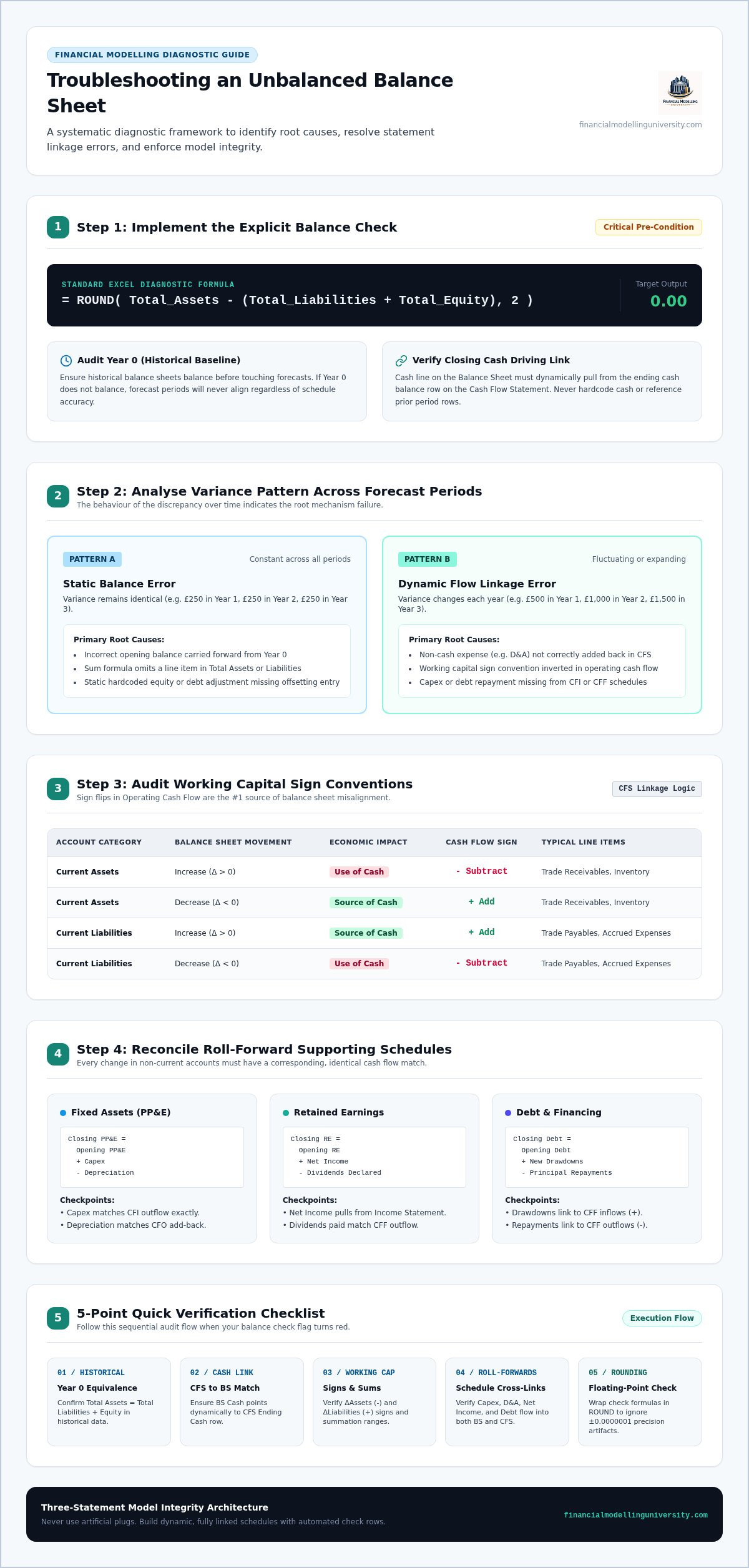
If you’ve resolved working capital issues but still find your three statement model balance sheet not balancing, the problem likely lies in your non-current asset or financing schedules. These areas involve complex roll-forward logic where a single broken link between a supporting schedule and the cash flow statement creates a permanent variance. Professional analysts use systematic reconciliations to ensure these long-term items remain aligned across all three statements. Every movement in a non-current account must have a corresponding cash flow impact, or the balance sheet will never zero out.
Trace every capital expenditure (Capex) outflow from your investing cash flow directly to the additions row in your property, plant, and equipment (PP&E) schedule. A common error is linking the income statement depreciation expense to the balance sheet but failing to capture the cash outflow for new assets. Confirm that net PP&E on the balance sheet equals gross assets minus accumulated depreciation. If you hardcode the ending balance instead of using a roll-forward, your model loses its dynamic integrity and fails to reflect changes in investment strategy accurately.
Audit your retained earnings equation: beginning balance plus net income minus dividends equals ending balance. A frequent mistake is treating dividends like an operating expense on the income statement; they must only appear as a deduction in equity and a financing cash outflow. Similarly, your debt schedule must feed the financing section of the cash flow statement. Confirm that drawdowns and principal repayments mirror these cash movements precisely. Check your share capital and reserves for unlinked share repurchases or issuances, as these are often overlooked during initial model construction. To build these schedules with professional precision, enrol in our financial modelling courses and access downloadable templates today.
Fixing a three statement model balance sheet not balancing once is only half the battle. You must build defensive architecture to ensure it stays balanced as your assumptions evolve. Professional financial modelling requires automated boolean check rows at the bottom of every worksheet. These rows should return a simple binary result: “OK” when the period balances and “ERROR” when it doesn’t. This systematic approach allows you to identify exactly when and where a formula break occurs during the build process.
Excel often produces negligible floating-point errors, where a variance of 0.0000000001 triggers a false alarm. Use the ROUND function to prevent these distractions. A formula like =IF(ABS(ROUND(Assets-Liabilities-Equity, 2))>1, "ERROR", "OK") ensures you only flag variances greater than one unit of your model currency. Aggregate these individual checks into a visible status header on your cover sheet. This central audit dashboard provides an instant health check across all model tabs, ensuring integrity across every forecast period without manual inspection.
Never force your balance sheet into alignment through artificial cash or equity plug cells. A “plug” is a modelling failure that disguises fundamental formula errors rather than fixing them. If you use a plug, your sensitivity analysis and scenario outcomes will be fundamentally flawed because the underlying cash flow logic is broken. A balanced model achieved through a plug is a liability, not a professional tool. Establishing rigorous error-trapping habits is essential for anyone aiming to perform at the level of elite practitioners. You can deepen your modelling discipline and error prevention through structured FMU financial modelling courses. These programs teach you to build robust, self-auditing models that withstand the scrutiny of investment committees and senior stakeholders.
Solving a three statement model balance sheet not balancing is a matter of discipline, not luck. By applying a systematic diagnostic framework, you move from frustrating trial-and-error to precise auditing. Remember to audit your sign conventions in working capital and reconcile every roll-forward schedule against the cash flow statement. These steps ensure your model remains a robust tool for valuation and decision-making. Building these habits now prevents hidden errors from undermining your professional credibility in high-stakes environments.
To further refine your technical skills, explore practical financial modelling courses at FMU. Our structured curriculum covers integrated financial statement mechanics in depth. You will also gain access to downloadable, practical Excel templates designed for real-world finance workflows. These resources provide the blueprint for building models that satisfy the most rigorous industry standards. Start transforming your workflow today and approach your next complex project with total confidence.
A constant variance suggests a static error in the opening balance or a missing line item in the balance sheet totals. If the variance doesn’t change across years, the issue is likely on the balance sheet rather than the cash flow statement. Verify that every historical asset and liability is included in your summation formulas. A common culprit is a hardcoded opening cash balance that doesn’t link to the prior period.
Working capital movements serve as the bridge between net income and the cash balance on your balance sheet. If you miscalculate these changes, your cash will be incorrect, resulting in a three statement model balance sheet not balancing. Ensure you subtract asset increases and add liability increases. Any error in these sign conventions directly impacts the cash line, causing the asset total to deviate from your liabilities and equity.
Circular references often freeze calculation values or return zeros, which breaks the integration between the income statement and the balance sheet. This typically happens in debt and interest schedules. When Excel stops calculating correctly, the closing cash balance on the cash flow statement fails to update. This logical break prevents the accounting equation from balancing, leaving your model with an inaccurate check row result that ignores assumption changes.
Omitting depreciation creates an expanding variance because the expense reduces retained earnings without an offsetting cash add-back. While the net book value of assets decreases, the cash balance remains static on the balance sheet. This creates a gap where total assets are lower than total equity. You must ensure the depreciation expense from the income statement matches the add-back in the operating section of your cash flow statement.
Using an artificial plug is never acceptable because it disguises structural errors that compromise the model’s integrity. A plug hides the fact that your cash flow logic is broken, which makes any subsequent valuation or scenario analysis unreliable. Professionals avoid these shortcuts to maintain industry trust. Instead, follow a structured diagnostic process to identify the broken link and ensure the three statement model balance sheet not balancing issue is fixed permanently.