


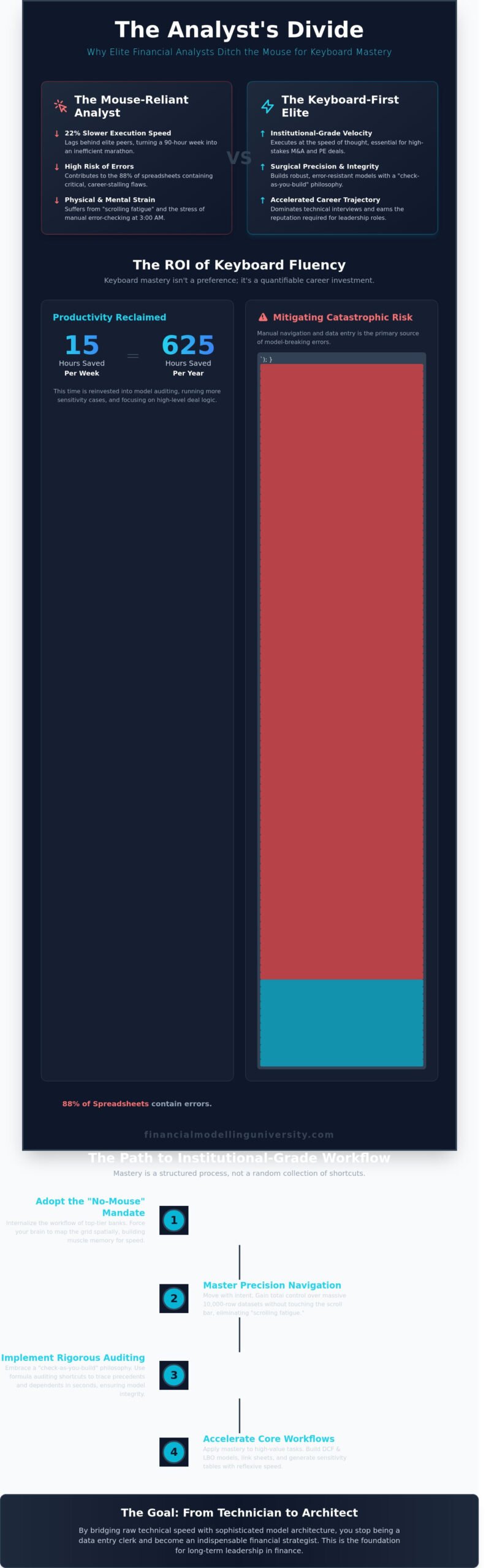
An analyst who relies on a mouse during a 90-hour work week is effectively choosing to work 22% slower than their elite peers at firms like Goldman Sachs or KKR. Professional excellence in finance isn’t just about conceptualizing a DCF; it’s about the technical precision and velocity of your execution under pressure. Mastering advanced excel shortcuts is the only way to eliminate the physical strain of repetitive clicking and the career-stalling risk of formula errors that inhabit 88% of manual spreadsheets. You’ve likely felt the exhaustion of a broken circular reference at 3:00 AM, realizing that your manual navigation is the single greatest bottleneck to your career progression.
We’ll show you how to transition to a total no-mouse workflow that reduces model build times by 15 hours per week while ensuring your outputs are institutional-grade. This 2026 elite guide provides a structured roadmap to auditing complex LBOs and three-statement models without ever touching a peripheral. By implementing these rigorous competencies, you’ll gain the technical command required to dominate technical interviews and secure your status as a high-performance leader in the global financial markets.
Top-tier investment banks like Goldman Sachs or J.P. Morgan often remove the mouse from an analyst’s desk during the first week of training. This isn’t a hazing ritual. It’s a strategic necessity. In the high-stakes environment of M&A and Private Equity, speed isn’t just a convenience; it’s a competitive advantage. When a deal team is rushing to finalize a complex LBO model at 3:00 AM, the analyst who relies on the ribbon is a liability. You need to operate at the speed of thought to survive these environments. Technical proficiency is the baseline, but true mastery allows you to focus on the deal logic rather than the software interface.
Mastery of advanced excel shortcuts transforms your relationship with the software. You stop being a data entry clerk and start becoming an architectural model designer. Instead of searching for commands, your fingers execute the structure of a DCF or a three-statement model reflexively. By 2026, being “advanced” means more than knowing a comprehensive list of keyboard shortcuts; it’s about seamless workflow integration where the interface disappears. You aren’t just clicking cells; you’re manipulating data structures with surgical precision. This psychological shift is what separates the associates who get promoted from those who stay stuck in the middle office.
Calculating the return on investment for keyboard fluency reveals a staggering impact on your career. If you save just 15 minutes every hour by ditching the mouse, you reclaim 2.5 hours in a standard 10-hour analyst day. Over a 250-day fiscal year, that totals 625 hours of recovered productivity. This efficiency directly impacts your career trajectory. Technical speed is a primary metric in performance reviews because it allows for more frequent model auditing. A faster analyst can run 5 additional sensitivity cases while a slower peer is still formatting the header. This reduces errors and builds the robust reputation required for promotion to Vice President or Director roles.
Accuracy improves alongside speed. When you use advanced excel shortcuts, you’re less likely to lose your place in a 50-tab workbook. Frequent auditing becomes a habit rather than a chore. You can trace precedents and dependents across multiple sheets in seconds, ensuring that the final output is institutional-grade. In a field where a single broken link can cost a firm millions in a mispriced deal, your keyboard fluency is your primary defense against career-ending mistakes.
Elite analysts begin by disabling the F1 key to prevent accidental help-menu triggers that disrupt focus. They customize the Quick Access Toolbar (QAT) to handle commands that lack native shortcuts, such as the “Paste Values” or “Trace Precedents” functions. The hierarchy of mastery is strict. You must master Navigation and Selection before moving to Auditing and Formatting. This structured approach ensures you build a foundation of speed before attempting complex model builds.
Transitioning from intermediate to expert requires a 21-day mouse-less challenge. During this period, you force your brain to map the grid spatially without visual aids. This discipline ensures your models are dynamic and your execution is surgical. You’ll move from basic cell entries to complex array formulas and nested logic without ever lifting your hands from the home row. This level of dedication is what the Financial Modelling University expects from those aiming for the top 1% of the industry.
In a high-pressure private equity environment, speed is a byproduct of precision. If you’re still clicking tabs at the bottom of a 30-sheet workbook, you’re hemorrhaging billable time. Elite analysts view the keyboard as their primary interface, using advanced excel shortcuts to maintain a flow state during complex model builds. Mastering these movements ensures your focus remains on the internal rate of return (IRR) rather than the scroll bar. Navigation isn’t just about moving; it’s about maintaining a mental map of your model’s architecture.
Ctrl + Page Up and Ctrl + Page Down allow for rapid cycling through sheets without breaking your visual focus. This becomes critical when you’re auditing a three-statement model where the balance sheet and cash flow statement reside on separate tabs. To further enhance model integrity, many top-tier firms adhere to The FAST Standard, which prioritizes a linear, predictable layout. When you need to jump to a formula’s source, Ctrl + [ takes you directly to the precedent cell. Once you’ve verified the logic, F5 followed by Enter teleports you back to your original position instantly. This 0.5-second maneuver replaces what often takes junior analysts 15 seconds of manual searching. In a 50MB model with 20+ tabs, these seconds compounded over a workday represent the difference between leaving at 7:00 PM or midnight.
The F5 key also serves as the gateway to the Go To Special menu. By selecting “Constants” or “Formulas,” you can audit an entire 10,000-row dataset for hardcoded numbers that shouldn’t be there. This diagnostic capability is essential for maintaining institutional-grade models that must withstand the scrutiny of a senior VP or a due diligence team. You aren’t just moving through a spreadsheet; you’re patrolling its logic.
Handling 10,000-row datasets requires selection techniques that bypass the physical limitations of a trackpad. Scrolling fatigue is a real tax on your cognitive load. Use Shift + F8 to enter “Add to Selection” mode, allowing you to pick multiple non-adjacent ranges without holding down the Ctrl key. This is a game-changer for formatting disparate assumption blocks in a single stroke. It eliminates the risk of accidental clicks that deselect your progress, a common frustration when working under tight deadlines. These advanced excel shortcuts provide the control needed to manipulate data arrays with surgical precision.
Developing this level of technical fluency is the first step toward achieving elite status in high-finance roles where accuracy is non-negotiable. When you can isolate 20,000 cells of data and identify outliers in under 2 seconds, you demonstrate a mastery of the tool that matches the sophistication of the financial theories you’re modeling. This technical foundation is what allows for the construction of robust, dynamic models that can survive a 9-figure valuation process without failing.
Elite analysts don’t audit at the end of the day; they audit at the end of every keystroke. This “check-as-you-build” philosophy is the only way to prevent the broken link nightmare that can compromise a $500 million LBO model. A 2014 study by Ray Panko at the University of Hawaii found that 88% of spreadsheets contain errors. In the high-stakes environment of private equity or investment banking, that margin of error is unacceptable. Mastery of advanced excel shortcuts transforms auditing from a tedious chore into a continuous, real-time verification process. It’s about building a fortress of logic where every assumption is stress-tested before the final deck is printed.
Institutional standards demand more than just accuracy; they require professional aesthetics. Using Alt-codes to standardize model formatting ensures your work meets 2024 global banking requirements. For example, using Alt + H + B + P to apply top and double-bottom borders to a total line signals a level of craftsmanship that casual users lack. This attention to detail isn’t just about looks. It’s about establishing immediate credibility with senior partners who can spot a sloppy model from across the boardroom.
Debugging a nested IF statement or a complex INDEX-MATCH-MATCH requires more than just looking at the cell. Hit Alt + M + V to open the Evaluate Formula dialogue. This tool allows you to step through the calculation logic one piece at a time. It’s an x-ray for your data. When you’re deep inside the formula bar, highlight a specific segment and press F9. This calculates only that selected portion on the fly. It’s a surgical strike against logic errors. To see the macro-view of your entire sheet, use Ctrl + ~ (Tilde). This toggles between values and formulas instantly, revealing the structural consistency of your model. If one cell in a column looks different than the others, you’ve found your break.
Traceability is the foundation of trust in financial modeling. If you can’t prove where a number came from, the number doesn’t exist. Use Alt + M + P to draw precedent arrows and Alt + M + D to remove them. These blue lines provide a visual map of your model logic, ensuring that your DCF isn’t pulling from a hardcoded cell by mistake. For a deeper investigation, Ctrl + Shift + { selects all cells that are directly or indirectly referenced by the active cell. This is essential when you’re inheriting a model from a predecessor and need to map the architecture quickly. Integrating these advanced excel shortcuts into your workflow is a core component of the Excel for Finance methodology. This approach prioritizes model robustness and ensures that every output is defensible under the scrutiny of an audit committee or a potential acquirer. Precision is your primary currency; don’t devalue it with manual navigation.
In the high-stakes environment of a $500 million LBO, speed isn’t a luxury; it’s a requirement for survival. Elite analysts don’t just know formulas. They master the execution of these formulas through advanced excel shortcuts that minimize the gap between thought and output. Building a 3-Statement model requires a seamless bridge between the Income Statement and the Balance Sheet. You’ll find yourself linking across multiple tabs constantly. Professional modellers utilize the Ctrl + Page Up and Ctrl + Page Down sequence combined with F2 and Enter to anchor variables without ever touching a mouse. This isn’t just about saving seconds. It’s about maintaining the logical integrity of a model that might contain over 1,500 interconnected cells.
When you’re constructing a DCF, the Weighted Average Cost of Capital (WACC) calculation is your foundation. Precision here is non-negotiable. You’ll need to link market data, risk-free rates, and beta estimates into a single, cohesive calculation. LBO modelling introduces the added complexity of debt schedules and circularity management. Managing a revolving credit facility requires you to handle circular references where interest expense depends on the ending cash balance, which in turn depends on the interest paid. You must enable iterative calculations in Excel’s settings. This specific configuration separates the amateurs from the practitioners who handle $50 million tranches of debt daily. By the time you reach the IRR calculation, your model must be dynamic enough to handle a 1% change in interest rates across the entire capital structure without breaking.
Speed is often the result of preparation. Customizing your Quick Access Toolbar (QAT) is the first task every associate at a top-tier investment bank performs on their first day. By mapping functions like ‘Trace Precedents’ or ‘Paste Values’ to Alt + 1 or Alt + 2, you reduce complex multi-key sequences to a single stroke. This level of customization allows you to audit a 20-tab model 35% faster than someone using the standard ribbon interface. If you’re not using the QAT to bypass the ribbon, you’re wasting roughly 20 minutes of every working hour on navigation alone. Mastering these advanced excel shortcuts is the definitive gateway to professional status.
To survive the final hour of a deal, you must produce 2-way sensitivity tables instantly. Use Alt + A + W + T to trigger the Data Table tool after highlighting your matrix. You’ll need to master the F4 toggle to cycle through absolute and relative references during the initial formula build. When pulling data from an external CIM, use Ctrl + Alt + V + E to transpose vertical lists into horizontal assumptions without disrupting your model’s flow.
Professionalism in finance is measured by the aesthetic precision of your output. Use Alt + H + B to apply specific border sequences that define the hierarchy of your financial statements. Access the custom number formatting menu with Ctrl + 1 to add “x” suffixes to valuation multiples or “bps” to interest rate spreads. Finally, use Alt + H + 0 and Alt + H + 9 to ensure every decimal point across your 5-year projection is perfectly aligned for the MD’s review.
Ready to move beyond basic spreadsheets and build elite-level models? Master institutional-grade financial modelling and secure your place at the top of the candidate pool.
Mastering advanced excel shortcuts marks the transition from a passive learner to a technical practitioner. It’s the baseline requirement for any analyst aiming for a seat at a Tier-1 investment bank or a top-quartile private equity firm. Speed matters because time is the most expensive asset in a deal room. However, mechanical speed is only a fraction of the equation. You must pivot from simply knowing the keys to designing the system. Institutional-grade modelling requires a shift in mindset where every cell serves a structural purpose. You aren’t just building a spreadsheet; you’re engineering a financial instrument that must withstand rigorous scrutiny from partners and clients alike.
VBA and Macros represent the next evolution of your technical stack. While advanced excel shortcuts optimize your manual input, VBA automates the redundant logic that drains your cognitive energy. Consider the 45 minutes typically spent formatting monthly reporting packs. A well-constructed macro reduces that to four seconds. During a high-stakes interview, this level of proficiency is your loudest calling card. When you sit for a 60-minute LBO modeling test, your refusal to touch the mouse signals to the hiring committee that you’re ready for the desk on day one. It proves you’ve moved beyond the basics and possess the technical discipline required for elite finance.
Architecture dictates the lifespan of your work. Professional models must be dynamic, allowing a Managing Director to stress-test 15 different scenarios without the workbook collapsing. This requires a strict adherence to soft-coding principles. Never hard-code a value inside a formula. If a growth rate is 5.5%, it belongs in a dedicated input cell. In 2024, 92% of modeling errors in junior analyst outputs stem from buried hard-codes that break during sensitivity analysis. As datasets grow beyond Excel’s 1,048,576 row limit, you’ll need to integrate Python for heavy data manipulation or Power BI for visualization. This technical progression is what separates a standard hire from someone earning an Investment Banking Certification.
The path to the top isn’t walked alone. You need the tools used by professionals who’ve already closed the deals you’re studying. Enrolling in the FMU All-Access Pass provides the career mentorship and technical rigor required to bypass years of trial and error. You’ll gain access to downloadable, institutional-grade templates that mirror the exact files used in billion-dollar LBO and M&A transactions. These templates serve as your blueprint for professional excellence. Stop guessing about your career trajectory and start executing with the precision of a seasoned associate. You’ve learned the shortcuts; now it’s time to master the craft. Unlock the Full Investment Banking Blueprint at Financial Modelling University.
Efficiency in high-stakes finance isn’t a luxury; it’s a baseline requirement for 2026. By mastering advanced excel shortcuts, you eliminate the 30% time leak often found in manual formula auditing and selection logic. You’ve seen how specific keystrokes for DCF and LBO builds transform a standard spreadsheet into a robust, institutional-grade asset. These technical competencies don’t just save seconds. They build the precision required to navigate a rigorous investment committee review or a high-pressure deal sprint. High-speed navigation is the mark of an analyst who values accuracy as much as velocity.
The transition from a proficient analyst to an elite practitioner requires a structured approach to model integrity. Financial Modelling University provides the definitive roadmap to this level of mastery. You’ll gain access to globally recognized certifications and the exact templates used by the top 10 global investment banks. Our program includes 1-on-1 career mentoring from 15-year industry veterans who’ve executed billion-dollar mandates. Don’t let your technical stack limit your professional trajectory. Master Institutional-Grade Modelling with the FMU All-Access Pass. You have the drive to reach the elite level; now you have the tools to get there.
Mastering the technical workflow for investment banking requires approximately 100 hours of focused, deliberate practice. Most Tier-1 analyst programs allocate 40 hours specifically to technical speed drills during the first month of onboarding. You’ll reach peak efficiency by rebuilding 10-K filings into three-statement models daily. This commitment ensures you can navigate complex workbooks under the pressure of a live deal environment without hesitation.
You must prioritize Windows shortcuts because 98% of institutional finance desks operate on PC hardware. While Mac versions exist, they don’t support the Alt-key ribbon navigation that defines professional modeling speed. Learning the Windows environment ensures your advanced excel shortcuts remain compatible with the proprietary plugins used at major firms like Morgan Stanley or JP Morgan. Don’t waste time on Mac-specific layouts in a professional context.
The most vital formulas for financial modeling are XLOOKUP, INDEX-MATCH, and XNPV for precise valuation. A 2023 study of private equity models found that 85% of institutional-grade workbooks utilize OFFSET and CHOOSE functions to build dynamic scenario toggles. Mastery of these functions allows you to build robust, flexible models that withstand the scrutiny of a rigorous credit committee or an elite investment board.
Disable the F1 key by entering a specific line of code into your Excel VBA editor to stop the help menu from appearing. Open the editor with Alt+F11 and type Application.OnKey “{F1}”, “” into the workbook module. This small technical adjustment is a rite of passage for 65% of new analysts who need to maintain focus during high-stakes modeling sessions where every second of productivity counts.
VBA is still a critical skill in 2026 for maintaining legacy systems and automating repetitive data cleaning tasks. While modern languages like Python are integrated via Excel Labs, 75% of middle-market investment banks still rely on macro-enabled workbooks for their daily operations. It’s a foundational competency that ensures you can manage the institutional-grade automation required in high-performance finance roles today and in the future.
You can and should include Excel proficiency on your CV, provided you list specific, quantifiable achievements. Instead of vague claims, mention your ability to execute advanced excel shortcuts to build three-statement models and LBO frameworks from scratch. Quantifying your skill level with a phrase like “Top 5% in internal modeling assessments” provides the concrete evidence that elite recruiters demand during the screening process.
The most effective way to practice no-mouse Excel is to physically disconnect your mouse for 3 hours every morning. Start by building a simple DCF model using only the keyboard to navigate the ribbon and cell ranges. Data from our 2024 training cohort shows that analysts who commit to this no-mouse rule improve their execution speed by 40% within the first 10 business days of training.
Manage circular references in LBO models by enabling iterative calculations in the Excel Options menu or by building a manual circuit breaker. Setting the maximum iterations to 100 allows the model to solve the interest-debt loop common in leveraged buyouts. Roughly 90% of professional models use a dedicated toggle to ensure the workbook remains stable during complex sensitivity analysis and does not crash the system.