


A cash forecast can balance perfectly and still be wrong. If receipts are placed in the wrong week, or last week’s assumptions remain after actual results arrive, the closing cash figure won’t support a reliable decision. Building a rolling cash flow forecast Excel model means getting both the timing and the update process right.
You already know cash forecasts need to change as new information comes in. The challenge is making those changes without breaking the link between opening cash, receipts, payments and closing cash. A clear weekly structure solves that problem and makes it easier to see when a shortfall could emerge.
This article shows you how to build the forecast, replace assumptions with actuals as each week closes, and roll the model forward consistently. You’ll also learn how to check that cash reconciles, compare actual results with forecast, and apply a downside scenario to test the effect of weaker receipts or higher costs. The result is a practical Excel tool that turns changing assumptions into timely cash decisions.
A forecast with an end date that never moves can become less useful each week. A static forecast keeps its original start and end dates, even as actual results replace estimates. A rolling forecast advances: when a period closes, you enter actual cash flows for that period and add a new future period at the horizon’s end. This keeps the forward-looking view current. In a rolling cash flow forecast excel model, each period should reconcile: opening cash plus net cash movement equals closing cash.
Suppose the forecast covers the next 13 weeks. Once week one closes, replace its forecast receipts and payments with actual results. Week two becomes the first forecast week, and you add a new week at the end to retain the 13-week horizon. Keep actuals and estimates clearly distinguishable, so a projected receipt isn’t mistaken for cash already received. The horizon stays consistent while its dates move forward.
Choose periods that match the decisions the forecast must support. Daily periods can help track near-term payment timing when cash is tight; weekly periods can show upcoming receipts and obligations; monthly periods may suit broader operating plans. A 13-week horizon is one practical option for short-term liquidity monitoring, not a universal rule. Set the span according to the business’s cash cycle and planning needs.
Keep the purpose clear. A short-term cash forecast focuses on when money is expected to enter or leave the bank. Longer-range operating forecasts examine drivers such as sales, costs and working capital, while valuation forecasts project financial performance to estimate value. These views may share assumptions, but they answer different planning questions.
Arrange the worksheet so each column represents a forecast period and each row represents a specific cash driver. This layout makes the source of a projected movement visible and helps you update assumptions without changing the model’s structure. In a rolling cash flow forecast excel model, keep input rows separate from calculation rows, and use consistent labels across periods.
Group rows by the drivers that explain when cash moves. On the receipts side, separate customer collections from other inflows. On the payments side, distinguish supplier payments, payroll, rent and tax where their timing or forecast basis differs. Avoid combining categories that need different assumptions: separating customer groups, for example, can make it clearer which collection pattern drives a variance. The U.S. Department of the Treasury’s cash flow forecasting guidance offers a reference for organising inflows and outflows.
Keep a dedicated row for each cash driver, with input assumptions entered in the relevant period column. Use formulas to aggregate the appropriate receipt rows and payment rows, rather than typing subtotal figures directly. For example, a receipts subtotal can use Excel’s SUM function across the receipt categories for that week. Carry forward the cash balance using a cell reference to the preceding period, not a repeated hard-coded input. This lets a changed assumption flow through the forecast and makes the workbook easier to audit. Apply one consistent sign convention for payments, and label units and period dates clearly so users can interpret each input correctly.
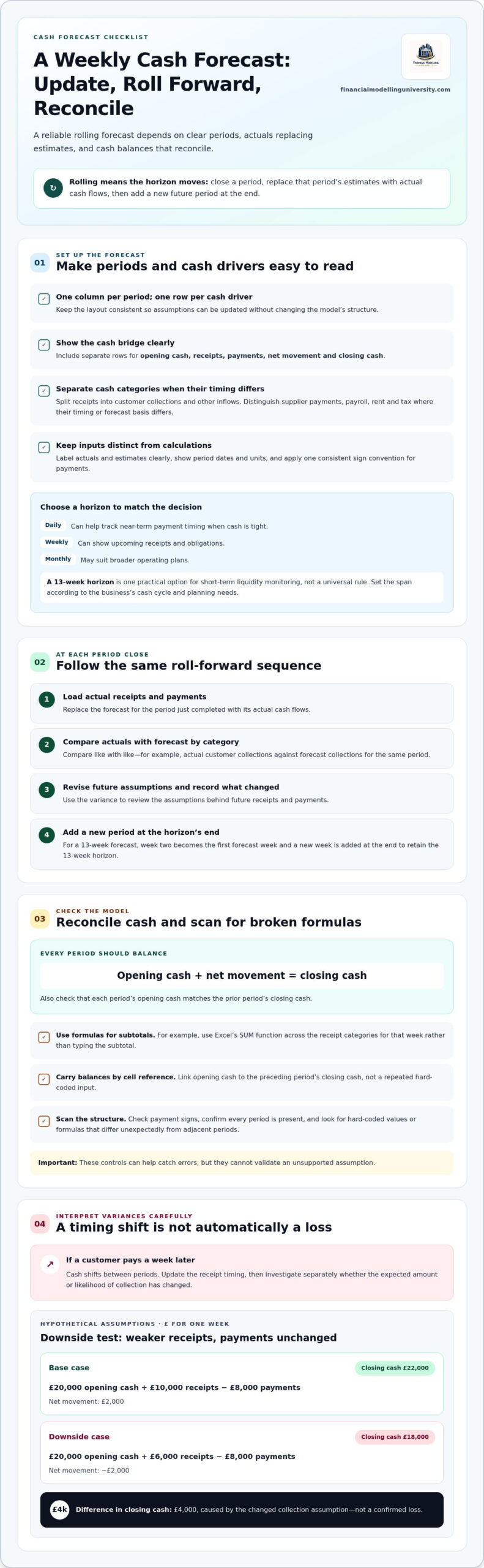
Update the model in the same order each period. A rolling cash flow forecast Excel file is only useful if actuals replace estimates cleanly and new assumptions remain visible.
Compare like with like: actual customer collections against forecast collections for the same period, and actual supplier payments against their forecast. A variance may reflect timing rather than a changed assumption. For example, a customer paying a week later shifts cash between periods; it doesn’t automatically mean the expected amount is lower. Update the receipt timing, then investigate separately if evidence suggests the amount or likelihood of collection has changed.
Use labelled scenarios to make uncertainty explicit. Hypothetical assumptions, £ for one week: both cases open at £20,000. In the base case, receipts are £10,000 and payments are £8,000, giving net movement of £2,000 and closing cash of £22,000. In the downside case, assume only £6,000 of receipts arrive in the week while payments remain £8,000. Net movement is −£2,000, so closing cash is £18,000. The £4,000 difference comes from the changed collection assumption, not a confirmed loss.
Check each period’s opening cash against the prior period’s closing cash, and confirm closing cash equals opening cash plus net movement. Keep payment sign conventions consistent, check that every period is present, and scan formula rows for hard-coded values or formulas that differ unexpectedly from adjacent periods. These controls help catch errors, but they can’t validate an unsupported assumption.
A projected closing cash balance is a signal, not a decision by itself. Read it alongside the weeks when cash moves and the categories driving the change. A rolling cash flow forecast Excel model is most useful when it shows whether a low balance results from delayed customer collections, concentrated supplier payments or another explicit assumption. That detail helps you focus on the right question before choosing an action.
Trace the forecast movement back to its drivers. Check which receipts are expected, when they are assumed to arrive and which payments fall due in the same period. Then test timing options in the model. For example, if a large customer receipt is forecast after a major supplier payment, model an earlier collection date as a scenario, not a confirmed outcome. Compare the resulting cash profile and assess whether the timing change is realistic before relying on it. The forecast supports a decision; it doesn’t guarantee that a proposed action will work.
Review the workbook process when categories no longer explain meaningful cash movements, source data arrives in inconsistent formats, or updates depend on repeated manual coordination. A more granular view may clarify which locations, customers or payment types drive the forecast, but added detail is useful only if it can be maintained and checked. Assign clear ownership for input updates and review, and document assumptions so that a change has a traceable source.
Keep the model proportionate to its purpose. If it feeds into a valuation, align its operating assumptions with the wider forecast rather than treating short-term cash timing as a substitute for long-term projections. DCF and valuation modelling is a distinct next step for developing that longer-range analysis. For broader spreadsheet work, apply consistent financial modelling conventions: make inputs identifiable, keep calculations transparent and ensure outputs can be traced to their drivers.
A rolling cash flow forecast excel workbook earns its place when it changes how you prepare, not just how you report. Use each update to ask what has changed, which assumptions matter most and what decisions the latest view supports. Keep those questions close to the model, and the forecast becomes part of a disciplined operating rhythm rather than a spreadsheet refreshed only when someone asks for it.
As you develop your wider financial modelling skills, Financial Modelling University’s self-paced courses include practical exercises and downloadable Excel models or templates as course materials. Selected courses also offer optional live Q&A webinars. Explore Financial Modelling University’s financial modelling courses and choose a path that supports your next modelling objective.
Build the process one clear assumption and one reliable check at a time. With consistent updates, your forecast can help you act with greater confidence as conditions change.
A rolling cash flow forecast is a regularly refreshed view of expected cash receipts and payments over a forward-looking period. Unlike a forecast tied to a fixed financial year-end, it retains a consistent planning horizon as time passes. Set a clear update rule, such as refreshing the model after each completed week, so everyone knows which periods are actual and which remain estimates.
Start by defining the periods and cash drivers your decisions depend on, then build formulas that carry balances forward. In a rolling cash flow forecast Excel workbook, add a clear status indicator for each period, such as “actual” or “forecast”. This helps prevent double-counting when new results are entered. Keep a dated copy of each update if you need to review how assumptions changed.
No. Choose a horizon and period length that match the cash decisions you need to make. A business with frequent receipts and payments may benefit from a short, detailed view, while seasonal trading or longer customer payment cycles may require a wider horizon. Consider whether the forecast captures the cash cycle that matters, and adjust its scope when that cycle changes.
Accuracy improves when you compare earlier forecasts with actual outcomes and use the differences to refine assumptions. First, confirm the forecast’s opening cash agrees with the relevant bank or cash records. Then review recurring misses by driver: are collections consistently later than expected, or are payment amounts changing? A forecast can reconcile mathematically yet still be inaccurate if its assumptions or source data are weak.