


An Excel model can calculate without errors and still produce an unreliable answer. Revenue may not flow through to cash, a debt schedule may not reconcile to the balance sheet, or a copied formula may omit a cost. This financial model audit checklist helps you trace important outputs back to their assumptions, formulas and supporting schedules, rather than relying on a quick scan for spreadsheet errors.
Work through the review in a consistent order: define the scope, map the model, test formulas and reconciliations, challenge the assumptions, then record findings and retest fixes. Focus on the mechanics that matter for the model’s purpose. A three-statement model depends on linked financial statements and working capital movements; a DCF requires careful checks of cash flows, discount rates and terminal value; an LBO needs a consistent debt schedule and returns bridge. The steps below show what to inspect and how to spot commercial logic that can fail even when formulas look consistent.
A forecast shows revenue rising and cash remaining positive, but those outputs alone do not show whether the results follow from the assumptions. Before opening Excel, define the decision the model supports, the periods to review, the file version and who will use the findings.
A financial model review examines a model’s assumptions, calculations, logic and outputs for a defined purpose. Its conclusions relate to the work performed and evidence available. State what the review covers, what it excludes and which inputs lack supporting evidence, so users can distinguish tested calculations from unresolved assumptions.
Match the review to the decision’s importance and the model’s complexity. A focused reasonableness check might test key drivers and outputs. A detailed review traces formulas across the workbook and tests supporting schedules. Tailor the work to the model: a three-statement forecast links earnings, the balance sheet and cash flow; a DCF depends on forecast cash flows and terminal value; an LBO needs consistent debt and returns mechanics. Project finance and real estate models require attention to the operating and financing drivers relevant to those assets.
Specify who will use the findings and what they need to see. A finance team checking a planning forecast may need clear evidence for budget assumptions, while someone assessing an LBO may need to trace cash available for debt repayment through to investor returns.
Map where inputs, calculations and outputs sit, then note the links between worksheets. Include supporting schedules such as working capital feeding into cash flow, debt balances feeding interest expense, and external files used as source data. This gives the reviewer a route from a headline result back to its calculation and inputs.
Record the file name and version, review date, periods covered, scope and exclusions. List missing source data and unresolved assumptions, and note which outputs they affect. This trail makes the review repeatable and helps future users distinguish a checked result from one that still needs evidence.
A forecast can show a smooth trend even when a copied formula omits a cost or points to the wrong period. Test mechanics in a fixed sequence: inspect formulas, trace precedents (the cells a formula uses), compare periods, check totals and reconciliations, then recalculate and retest key outputs. This is the core of a financial model audit checklist.
#REF!, unexplained overrides and formula patterns that change between periods.Not every hardcode is an error. An opening balance or one-off transaction may be intentionally entered, while a forecast growth rate should usually be visible and traceable. Check whether the input has a clear source and whether the formula uses it consistently across periods.
For example, if forecast units are 120 and price is £50 per unit, revenue is =120*50, or a formula referencing the relevant input cells, which gives £6,000. Confirm that the model applies the same units and calculation logic in each forecast period. If a formula changes, identify whether a genuine business event explains the change or whether it is a copy error.
Check that statements and supporting schedules reconcile according to the model’s logic. In a three-statement model, closing cash on the cash flow statement should match cash on the balance sheet. Check that assets equal liabilities plus equity, and that closing retained earnings reflect opening retained earnings and the relevant profit and distribution movements.
For a debt schedule, test whether opening debt, borrowings and repayments produce closing debt, then check that the closing balance feeds into the balance sheet. Review signs and units throughout: a working capital outflow should reduce cash under the model’s stated convention. Inspect circularity settings and error outputs if the workbook uses circular calculations.
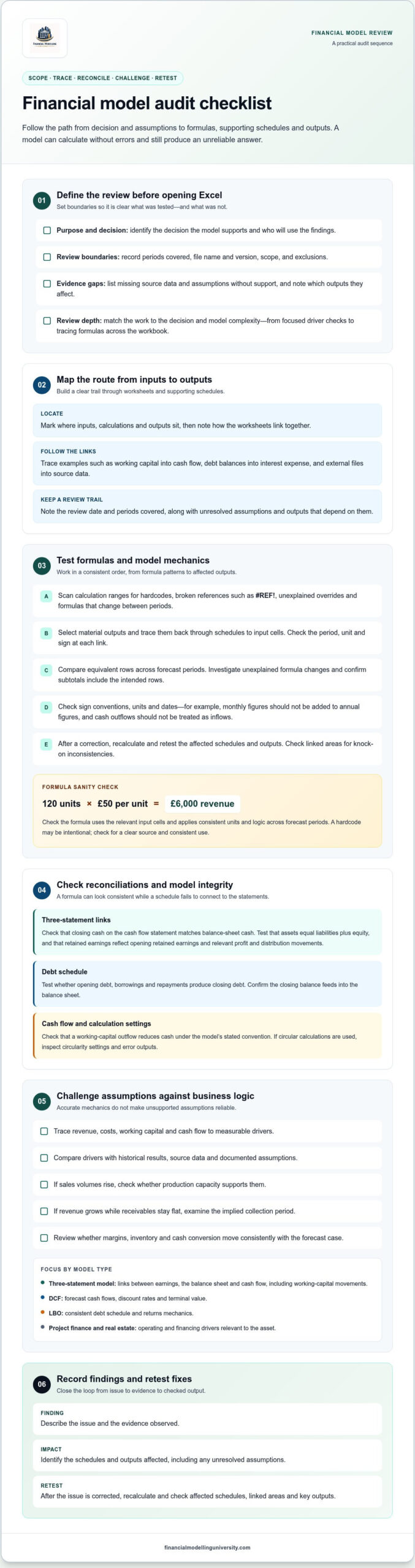
Consistent formulas can still produce an unreliable forecast if the assumptions do not reflect how the business operates. Trace revenue, costs, working capital and cash flow to measurable drivers. Compare those drivers with historical results, source data and documented assumptions, and identify which outputs depend on inputs that lack support.
Test whether the operating story holds together. If sales volumes rise, check whether production capacity supports them. If revenue grows while receivables stay flat, examine the implied collection period. Review whether margins, inventory and cash conversion move consistently with the forecast case. A financial model audit checklist should test these relationships, not just whether input cells are filled in.
The table uses hypothetical annual assumptions. Revenue equals units sold multiplied by average price. The directional effect shows the expected revenue change before costs.
| Scenario | Assumptions | Formula | Revenue effect |
|---|---|---|---|
| Downside | 90,000 units at £19 per unit | 90,000 × £19 | £1.71m, lower |
| Base | 100,000 units at £20 per unit | 100,000 × £20 | £2.00m, reference case |
| Upside | 110,000 units at £21 per unit | 110,000 × £21 | £2.31m, higher |
Check the arithmetic and the model links behind each case. The table changes both volume and price, so it shows the combined revenue effect, not the isolated impact of either driver. It also excludes costs, so it does not by itself show the effect on profit or cash flow.
Scenario analysis changes several assumptions together; sensitivity analysis changes one input at a time to show its individual effect. Use both to see how the model responds, not to prove that an assumption is correct. First change material drivers individually, then combine downside movements that could plausibly occur together. Check that the resulting cash flow and decision metrics make sense given the operating assumptions.
For a DCF, examine how changes in forecast cash flow, the discount rate and terminal value assumptions affect valuation. For an LBO, follow operating performance through cash available for debt repayment, debt paydown and investor returns. Check that the returns bridge responds to the operating case and financing assumptions, rather than to an accidental formula change.
A finding is not closed just because someone edits a cell. Record what you found, why it matters, who will resolve it and how you will verify the change. This turns a financial model audit checklist into a review trail that others can follow.
Rank issues by their effect on the decision the model supports. A forecast error that changes cash available for debt repayment is more significant than a formatting inconsistency. Explain the consequence, not just the symptom. A checklist structures the review, but it cannot guarantee that every error will be found or that every assumption is valid.
| Worksheet or cell | Issue and evidence | Priority | Action | Status |
|---|---|---|---|---|
| Cash Flow, forecast period | Working capital movement excluded from operating cash flow | High, affects cash available | Correct link, recalculate and compare cash outputs | Retest pending |
| Summary, title cell | Period label does not match forecast dates | Low, presentation issue | Update label and verify date range | Open |
Log each finding with enough evidence for another reviewer to reproduce it. Assign an owner and action, then correct the issue and retest affected schedules and outputs. Close the finding only after checking the result. Save the revised workbook as a new version and retain the reviewed file. Record exclusions, source gaps and unresolved limitations alongside the findings.
Practise tracing assumptions through a model and checking how changes affect its outputs. FMU courses include downloadable Excel models and templates, practical exercises and step-by-step video lessons. These materials provide a way to practise model structure and review habits alongside a defined audit process. Course information is available in the FMU financial modelling course catalogue.
A review is most useful when its findings inform what happens next. Carry unresolved assumptions and limitations into the decision discussion, and keep the review record with the model so future users understand what was examined and what still needs attention.
Use the financial model audit checklist as a repeatable discipline, not as a sign-off that removes all uncertainty. When the model changes or supports a different decision, revisit the scope and update the review trail. This helps users understand the basis for the forecast and the limits of the work performed.
To build practical modelling skills, explore FMU’s self-paced courses, which include a certificate of completion. Selected courses also include optional live Q&A.
Explore FMU’s financial modelling courses and choose a course relevant to the models you work with.
No. A financial model review examines the Excel tool, including its assumptions, calculations, links and outputs. A financial statement audit examines reported financial statements and supporting evidence under the applicable audit framework. The two may consider related figures, but they address different questions. Reviewing a forecast model does not replace an audit of financial statements, and audited statements do not establish that a separate forecast model is sound.
There is no single review interval that suits every model. Review it before a material decision relies on its outputs, and reassess it after significant changes to the business, transaction structure, source data or model design. For example, a revised financing plan may make an earlier LBO review incomplete. Set review timing according to how the model is used and how much its inputs or mechanics have changed.
No. A financial model audit checklist helps structure testing, but it cannot guarantee that every error or incorrect assumption will be found. A reviewer may identify a faulty calculation but lack evidence to validate an underlying forecast input. Treat findings as scoped conclusions: document what was examined, what could not be verified and which limitations could affect the decision.
Yes, but missing evidence limits what the review can establish. For example, if customer-level sales data is unavailable, you can still test whether forecast revenue follows the model’s stated volume and price assumptions. Record that the inputs lack supporting data, identify the outputs they affect and avoid presenting them as independently validated. The decision-maker can then see which conclusions rely on unsupported inputs.