

A purchase price is attractive only if the returns hold up when assumptions change. LBO sensitivity analysis varies one or two assumptions while holding the rest constant, then shows how outputs such as equity IRR respond. In Excel, a two-variable data table tests combinations of inputs, such as exit multiple and leverage.
A base case gives you a starting point, but it does not show how exposed returns are to a lower exit multiple or higher entry price. Test these assumptions systematically to see what drives the result and when the investment case becomes less compelling.
This article explains how to build and read LBO sensitivities, how sensitivity analysis differs from scenario analysis, and how to work backwards from a target IRR to assess purchase price. It also covers how to choose useful assumptions and ranges so your financial model supports a clear investment decision.
An LBO sensitivity analysis tests how changing assumptions affects an output such as equity IRR. Common errors include mislinking input cells, using implausible ranges, and overlooking delays in data-table calculations.
Place the model output, such as equity IRR, in the top-left cell of a blank table. Enter exit multiples across the top row and leverage assumptions down the first column. Select the table and use Excel’s Data Table command. Set the row input cell to exit multiple and the column input cell to leverage. Mark the base-case assumptions and format the output consistently.
Read each intersection as the model output for that pair of assumptions. For example, compare how equity IRR changes as exit multiple and debt-to-EBITDA vary across the table. With other inputs fixed, a higher exit multiple should generally increase returns. If results shift unexpectedly, check the output formula and both input-cell links before interpreting the table.
Choose an output formula that fits the cash flows being tested. Excel’s NPV function discounts periodic forecast cash flows, while RATE solves for a periodic rate in a defined payment structure. Link the relevant formula to the sensitivity table’s output cell, then vary assumptions using its row and column input cells. For irregular LBO equity cash flows, use an IRR measure suited to the model’s timing.
Excel data tables recalculate each cell when the model updates, which can slow a large financial modelling workbook. Place the tables on a separate Sensitivity or Output tab and use Automatic Except for Data Tables when recalculation becomes disruptive. After changing assumptions, press Ctrl + Shift + F9 to force recalculation, then confirm the base-case output still matches the model.
Build separate sensitivities for purchase price, operating performance, exit timing, and debt. Each table should answer a specific investment question and show a clear output, such as IRR or MOIC.
Choose entry and exit multiple ranges that reflect the valuation question, not arbitrary extremes. For an entry-multiple test, use 8.0x to 10.0x in 0.5x increments, then compare those assumptions with exit multiples. Keep EBITDA and operating forecasts consistent across cells. Mark the base case, and check that each transaction multiple changes the correct purchase-price or exit-value input.
Place entry multiples on one axis and exit multiples on the other, with five-year MoIC or equity IRR as the output. This table shows how a higher entry price combined with a lower exit valuation affects returns. A higher entry multiple should generally reduce returns, while a higher exit multiple should generally increase them. Trace unexpected reversals to the model links or timing assumptions.
Use exit year and exit multiple as inputs when investment timing is uncertain. Compare the model’s current exit year with an alternative exit in year 4, while varying the exit multiple from 16.6x to 18.6x. The IRR output captures both sale value and holding period. Confirm that each exit-year case uses the matching year’s EBITDA and debt balance, rather than repeating another year’s figures.
Place leverage, measured as debt to EBITDA, on one axis and exit multiple on the other. Review equity IRR alongside debt repayment and ending debt: more borrowing can raise equity returns while increasing financing risk. Use plausible financing cases and tie interest assumptions to the relevant debt tranches. This separates the effect of leverage from changes in exit valuation.
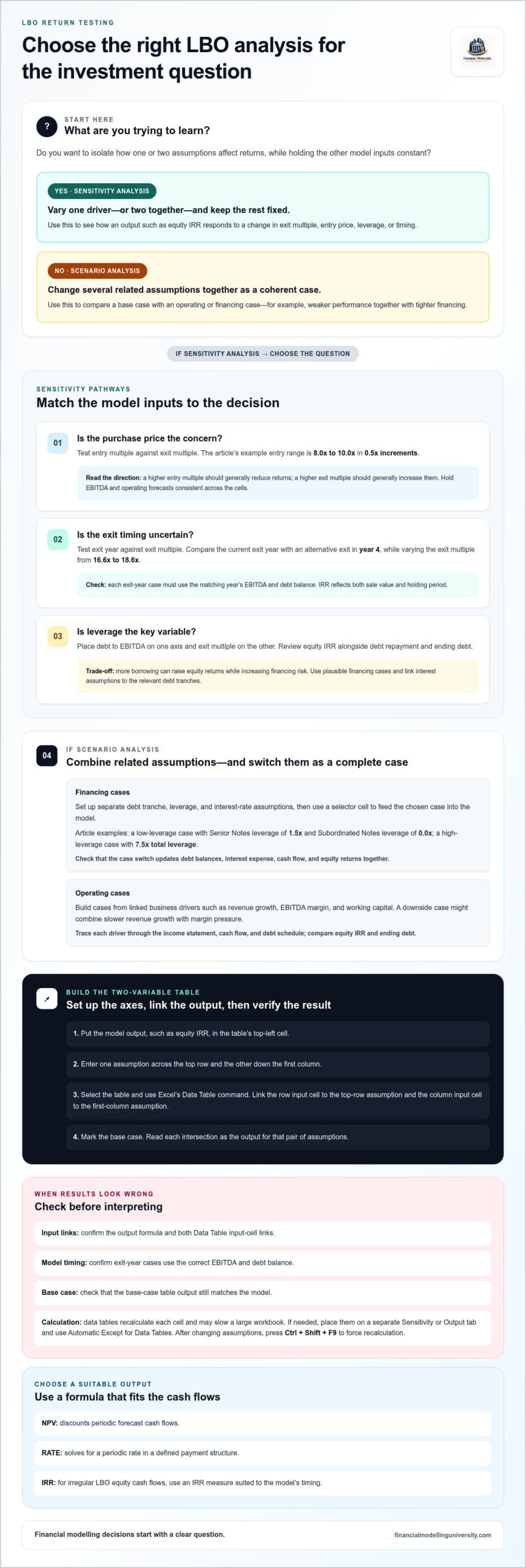
Use sensitivities to isolate an input’s effect; use scenarios to change related assumptions together. In an LBO, this distinction helps show whether equity returns depend on one valuation driver or on a complete financing and operating case.
Create separate financing cases for debt tranches, leverage and interest rates, then use a selector cell to feed the chosen case into the model. For example, a low-leverage case can use Senior Notes leverage of 1.5x and Subordinated Notes leverage of 0.0x; a high-leverage case can use 7.5x total leverage. Check that switching cases updates debt balances, interest expense, cash flow and equity returns together.
Keep each case’s assumptions visible in a labelled table. Do not change only the headline leverage input if the debt schedule still uses interest rates or repayment terms from another case.
Build operating cases from linked business drivers, such as revenue growth, EBITDA margin, and working capital. A downside scenario might combine slower revenue growth with margin pressure, while the base case retains its central assumptions. Trace each driver through the income statement, cash flow, and debt schedule, then compare equity IRR and ending debt.
Keep operating scenarios distinct from financing cases before combining them. A matrix of operating and financing cases shows whether returns rely on stronger trading, more leverage, or both.
Work backwards from the required equity return to find a supportable entry price. This treats purchase-price analysis as a model output, not just a negotiated assumption.
LBO analyses commonly test target IRRs in the 20%-25% range. MOIC hurdles depend on the investment mandate and holding period, so assess them alongside IRR.
Calculate IRR from the sponsor’s equity cash flows, including contributions and proceeds on their correct dates. Calculate MOIC by dividing total equity proceeds by invested equity.
Link the sensitivity table’s output cell to the model’s return calculation. For a single exit, include the sponsor’s initial equity contribution and net sale proceeds. Account for interim distributions or further contributions when they occur. Before relying on the result, check that cash-flow signs and dates match the transaction timeline.
Set purchase price as the table’s column input and target IRR as the output to compare implied entry prices. Keep financing, operating forecasts, and exit assumptions consistent across the table. Otherwise, the implied price may reflect changing deal terms rather than the required return.
Choose a return hurdle that fits the investment case, then identify the purchase price at which modelled IRR meets it. Compare adjacent price cases to see how sensitive the result is to entry valuation. Even a small price change can affect the equity required at close while forecast operating performance remains unchanged.
Use MOIC as a companion check, not a substitute for timing. The same multiple of invested capital can correspond to different annualised returns, depending on when proceeds arrive. Confirm that the purchase price still meets both measures under the operating and exit assumptions you consider credible.
Financial Modelling University’s LBO Financial Models online course helps learners build and check transaction models in Excel. It is useful when you want structured practice connecting transaction assumptions, debt schedules, and equity returns rather than treating each calculation as a standalone formula.
Course materials include downloadable Excel models and templates, practical financial modelling exercises, and step-by-step video lessons. Practise tracing an assumption change through the model, checking the resulting debt and cash flows, and presenting return outputs clearly.
A sensitivity table is most useful when it changes how you assess a deal. Turn its output into a decision rule: identify the assumptions that matter, decide what evidence would support them, and define how the investment case changes if they shift. This keeps an LBO model connected to diligence rather than treating its results as a standalone answer.
In your next review, challenge the inputs behind the headline return. Ask whether the operating case, financing structure, and purchase price remain coherent together. A clear lbo sensitivity analysis shows where those assumptions reinforce one another and where the investment depends on a narrow outcome.
Strengthen your Excel modelling skills with a structured learning path. Explore Financial Modelling University courses and choose the material that fits your next modelling challenge. Keep testing your assumptions, and build each model to support a sharper decision.
Common variables include entry price, exit multiple, leverage, operating performance, financing costs, and exit timing. Select assumptions that test the investment thesis: a growth-led deal may focus on revenue growth and EBITDA margin, while a debt-led case may test borrowing levels and interest rates. Keep the output focused, such as sponsor IRR or MOIC, so each table answers a clear underwriting question.
A higher purchase price generally requires more equity at entry, lowering returns if exit proceeds remain unchanged. A higher exit multiple increases enterprise value at sale, all else equal. For example, calculate exit value as exit-year EBITDA multiplied by the exit multiple, then subtract net debt to estimate equity proceeds. Test both assumptions together, since an attractive exit valuation may not offset an aggressive entry price.
Higher revenue growth or EBITDA margins can increase EBITDA, cash generation and debt repayment, which may lift equity proceeds. Test their timing and interaction, not just the final-year result. For an illustrative operating case, compare a 30% EBITDA margin in year 1 with 35% in years 2-5 and 40% after year 5. Trace each assumption through cash flow and debt balances before assessing returns.
More leverage can reduce the sponsor’s initial equity contribution, but interest expense also reduces cash available for repayment and distributions. Higher rates can therefore weaken equity returns even when debt-funded proceeds remain unchanged. Track each tranche separately: opening balance, interest, scheduled repayment, and ending balance. Compare ending debt across financing cases, since the same exit enterprise value can produce different equity proceeds.
An earlier exit can produce a higher annualised IRR if proceeds are similar, because the return is earned over less time. A later exit may allow more EBITDA growth and debt repayment, potentially increasing MOIC, but delays cash proceeds. Use the selected exit year’s EBITDA and debt balance in the model. Include interim distributions in the equity cash flows if the deal produces them.
Link the table’s top-left output cell to the return metric you want to test, then place one assumption across the top and another down the first column. Use Excel’s Data Table command to assign the row and column input cells. Test one combination against the model’s base case, then check that changing an assumption moves the output in the expected direction.