


A forecast built on a single growth percentage can look precise while hiding the assumptions that matter. A revenue forecasting model Excel users can audit should calculate revenue from operating drivers, not an unsupported percentage. Show how price, customer volume and churn combine to produce each revenue line, so you can challenge the inputs behind the result.
If you’re unsure which operating drivers belong in the forecast, or how revenue growth feeds into working capital and cash flow, start with the mechanics. This article shows you how to build a transparent, formula-driven model in Excel, with clearly labelled assumptions and formulas that are easy to review.
You’ll forecast customers, account for churn, apply pricing and calculate revenue period by period. Then you’ll test assumptions with scenarios and sensitivities, and link the result to receivables, working capital and cash flow. The aim is a forecast you can explain, stress-test and reconcile, not a spreadsheet that simply extends last year’s growth rate.
A forecast that applies one growth rate to total revenue can hide what is changing underneath. A useful revenue forecasting model in Excel estimates revenue period by period, separates it by stream and makes the assumptions behind each line visible.
A driver-based revenue forecast estimates each revenue stream for each period by applying explicit assumptions about business activity, pricing and timing. For example, a transaction-based business might forecast transaction volume multiplied by average fee, while a product business might use units sold multiplied by average selling price. A single growth percentage can be a useful cross-check, but it won’t show whether the change comes from volume, pricing or another driver.
Show revenue by stream and period, and label each driver with its unit. For example, distinguish customer counts from revenue per customer, and units sold from price per unit. This makes the model’s logic easier to review and provides a practical starting point for linking revenue assumptions into a wider financial forecast.
Match each revenue stream to the activity that generates it, the price charged and the timing of the sale. Choose units that fit the business: customers and churn for subscriptions, transactions and average fee for a marketplace, or units and selling price for product sales. Keep streams with different economics separate so that one set of assumptions doesn’t obscure another.
Separate historical actuals from forecast periods with clear labels, and retain actual results for comparison. Use past performance to inform assumptions, not to assume trends will continue unchanged. Flag one-off events, missing data and business changes, such as a new pricing structure or sales channel, that weaken historical comparisons. Document adjustments so reviewers can distinguish reported results from forecast inputs.
Build the forecast in sequence: organise historical actuals, define revenue streams, set operating assumptions, calculate revenue by period, then check the outputs. Link each assumption to a formula so it’s clear how a change in volume, price or churn affects the result.
Hypothetical example: 1,200 units sold per month × £25 per unit = £30,000 monthly revenue. Units multiplied by pounds per unit produce pounds of revenue for the month. In Excel, link the forecast units and price cells into the formula instead of typing £30,000 directly into the output. Changing either assumption will then update the calculation.
Use separate calculations when products, customer behaviour or contract structures have different revenue drivers. Product sales might use units × selling price, while subscriptions could use active customers × monthly fee. For a subscription forecast, calculate the customer base after cancellations and additions before applying the fee. Keep the formula logic beside the assumptions, then sum stream-level revenue. Check that the total matches its components so reviewers can trace and reconcile the output.
Separate inputs, calculations and outputs, and label each with a unit and period. Use consistent formatting to distinguish assumptions from formulas. Avoid hard-coding forecast values inside calculation formulas; reference the relevant assumption cells instead. For example, a monthly revenue formula should use monthly volume and monthly pricing assumptions. This makes updates easier and lets a reviewer follow the calculation from input to output.
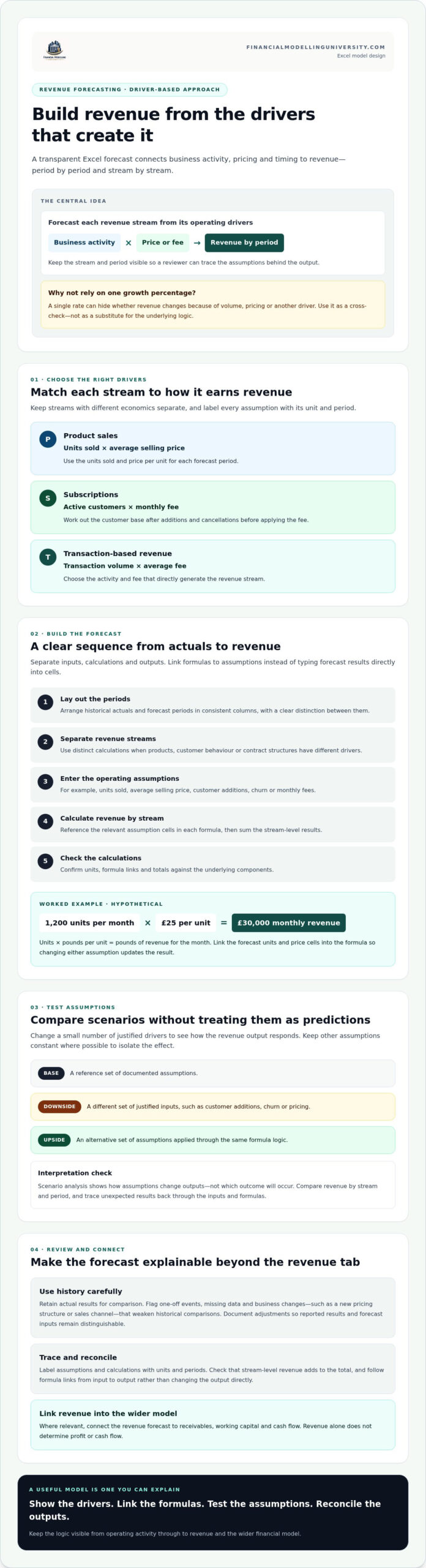
A forecast is only as useful as the assumptions behind it. Create base, downside and upside cases by changing a small set of justified drivers, such as customer additions, churn or pricing. Keep other assumptions constant where possible so you can isolate what is driving the change in revenue.
Scenario analysis shows how assumptions change outputs, not which outcome will occur. Treat each case as a conditional illustration, not a prediction or guaranteed result. Document the inputs for each scenario and compare revenue by stream and period. If a result looks unexpected, trace it back through the assumptions and formulas rather than changing the output directly.
Revenue and cash collection may fall in different periods. For credit sales, link forecast revenue to an accounts receivable assumption, such as collection days, then reflect the change in receivables in the cash flow forecast. Use assumptions that fit the company’s billing and payment patterns. A rise in reported revenue can precede the related cash receipt, so don’t treat sales as cash collected by default.
Review formula consistency across forecast periods. Investigate unexplained jumps, missing links and hard-coded forecast cells. Confirm prices, volumes and revenue use compatible units and periods, and check that the forecast begins from the correct historical actuals. Reconcile each period’s total revenue to the sum of its streams, then trace material variances to their source.
These checks help distinguish a genuine change in trading assumptions from a spreadsheet error. They also make the forecast easier to update as new actual results become available.
A revenue forecast is an input to the operating model, not a complete view of performance. Link each stream to the costs and working-capital balances it drives. For example, higher sales may increase variable costs and, if customers pay later, accounts receivable. These connections show how operating assumptions affect profit and cash movement.
In a three-statement model, forecast revenue feeds the income statement. After operating costs, interest and tax, profit flows into retained earnings, while cash collection and other working-capital movements affect the cash flow statement and balance sheet. Revenue alone doesn’t determine profit, cash flow or valuation. Margins, payment timing, investment and financing assumptions also matter.
Use the operating forecast as the starting point for a discounted cash flow (DCF) model. Revenue assumptions flow through operating costs, taxes, working capital and capital expenditure to produce forecast free cash flow, which informs valuation. Don’t value the revenue line in isolation. The DCF & Valuation course page provides further information on this modelling topic.
Compare actual results with the forecast by period and revenue stream. Separate volume, pricing and timing variances where the data allows, then document material changes to assumptions. This turns the model into a tool for updating the outlook, not just a one-off spreadsheet. You can also apply these review habits in broader financial modelling and investment banking models.
Keep the forecast linked to operating assumptions and financial statements, then update it as actual performance provides new evidence.
A useful revenue forecasting model in Excel makes its assumptions visible. Forecast each revenue stream from suitable operating drivers, keep actuals distinct from forecast periods, and check that formulas, units and totals reconcile.
Then test a base, downside and upside case by changing a few justified assumptions. These scenarios show how different inputs affect revenue, not which outcome will happen. Link the forecast to costs, working capital and cash collection so you can see how revenue assumptions flow through to profit and cash flow. Revenue is an important starting point, not a complete financial outlook.
Build your modelling skills with structured practice. Explore FMU financial modelling courses, which include practical exercises, step-by-step video lessons and downloadable Excel models and templates as course materials.
Keep your assumptions clear, test them regularly against actual results, and make each forecast line easy to trace. With disciplined model design, you can explain not only what the forecast shows, but what drives it.
Build it by forecasting each revenue stream from the operating assumptions that drive it. Organise historical actuals separately from forecast periods, choose suitable drivers such as customers, transactions or units sold, and link those inputs to formulas. Calculate revenue by stream and period, then check the units, formulas and totals. Keep assumptions clearly labelled so another reviewer can trace each output.
Use the formula that reflects how the business earns revenue. For product sales, forecast units sold multiplied by average selling price. For subscriptions, forecast active customers multiplied by revenue per customer for the period. If churn applies, calculate active customers after cancellations and additions before applying the price. In a revenue forecasting model Excel worksheet, link each driver to an assumption cell rather than typing forecast revenue directly.
Use the operating evidence available, and label assumptions clearly. Start with known inputs such as customer pipeline, contracted volumes, capacity, current prices or planned launch timing. Build a transparent formula from those drivers, then show how changing uncertain assumptions affects the result. Avoid presenting a short or incomplete historical trend as a reliable growth rate. Update the forecast as actual trading data becomes available.
Create base, downside and upside cases by changing a small number of justified drivers, such as price, new customers or churn. Keep the scenario assumptions visible and let formulas recalculate revenue for each case. Compare the outputs by period and stream, then identify which assumptions explain the difference. Scenarios are conditional illustrations of how inputs affect results, not predictions or guarantees.
Revenue affects cash flow through collection timing and working capital. If customers buy on credit, forecast accounts receivable using an appropriate collection assumption, then reflect changes in receivables in the cash flow statement. Revenue may be recognised before cash is collected, so don’t treat forecast sales as cash receipts in the same period by default. Link the revenue schedule to billing and payment assumptions that fit the business.